My Journey with DuckDB: Processing 70GB Files in Minutes
By Avik Mukherjee | Dec 13, 2025 · 6 min read · Updated Dec 13, 2025
Before I begin about my journey with DuckDB we need to know about what DuckDB really is and what kind of problem is it really aiming to solve?
What even is DuckDB?#
DuckDB is an open source analytical database engine built specifically for OLAP workloads where you would wanna go through million of records and give some meaningful output. It is designed to be fast as F, easy to use and embed anywhere and lightweight as F.
Another super power of DuckDb is that it is designed to handle modern data formats like Parquet, CSVs, Cloud Buckets. So instead of forcing you to read data in a specific format, you can use multiple formats of it.
Now since you have gotten the basic idea of DuckDB, let's talk about some of it's design choices as:
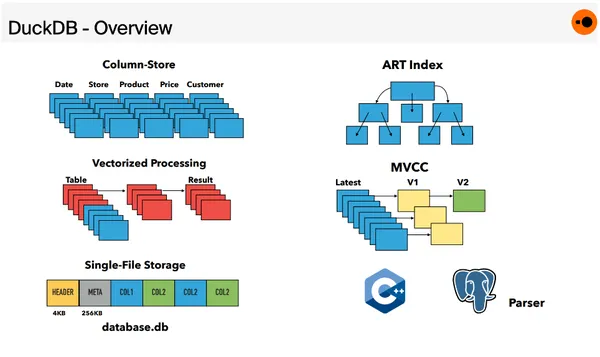 DuckDB architecture comparison with OLTP DB architecture
Columnar Structure of Data Storing: In here, Data is stored in Column Wise manner rather than Row Wise which make the aggregations, filters and scans extremely faster and if you vectorized execution where the data is processed in chunks, the queries will take literal seconds.
In-Memory Execution: DuckDB can run analytics in-memory without requiring you to load entire datasets into RAM. You can query Parquet, CSV, and Arrow files directly. No preprocessing. No imports. No ETL dance.
Embedded, Serverless and Simple: There is no Server to maintain (technically you can by using Mother Duck). You can just embed it and of it goes to do the work that you throw at it.
My Experience with it 👀#
So I got my first experience with DuckDB a few months back where in my current organisation, I was assigned a task to process large files like really large somewhere in the range of 69+ GB of size and generate proper data from it as required.
My first approach was to break the file into chunks and stream them into the database at a controlled rate so it wouldn't overload the system. Sounds simple, right? But in reality it was the biggest piece of DS that I created.
 Approach One Architecture
Chunking itself hammered the CPU, splitting a 10–20GB file took 30–40 minutes, and the database insert rate became a constant bottleneck. We had to throttle the writes just to avoid crashing the DB — the entire pipeline was fighting us instead of helping us.
Now during that time, I got introduced to DuckDB and ohh boii we are back for round 2 and this time, I was prepared. But as I learned the hard way and I quote: Nothing Goes the Right Way.
I again did a critical mistake. I was now chunking the file and then giving it to DuckDb, so I solved one part of the problem but still that major part was remaining which was the chunking.
 Architecture Diagram 2
Now during this time as well, it didn't worked (as you would expect), so I tore through the docs, interrogated AI models like they owed me money, and finally uncovered the one piece of information I had been missing the entire time.
Streaming!
yep you heard that right. Streaming but not like your Video Streaming, I mean data streaming — letting DuckDB read the file in a single continuous pass without me manually slicing, dicing, microwaving, and pureeing the file into chunks.
 Approach 3
Explaining the Code#
Now it is the hard part, since I am writing this after a month of doing the task. I can't show the full production code I wrote (company secrets and all that), but this small snippet below captures the core idea behind the architecture I ended up using:
 Snippet and Lighter version of the production code
Now the above snippet is the main core idea that I used in the production code as well. Let me break it down step by step:
Creating the DuckDB Instance: In production, I dynamically allocate DuckDB instances with configurable memory limits and thread counts (based on file size).
Replacement of Chunking Pipeline:
 Replacement of Chunking Pipeline
This is what my actual production code does as well but more configs and log handling as needed.
In here DuckDB streams the file itself, No manual chunk splitting, No sliding windows, No offset pagination and No multipass scanning. This is the "single-pass" moment that saved me hours per file and removed 90% of the code I had written earlier.
3. The Magic:
 The Magic
The above line that I was missing in my first two attempts. It says that "Read the file in 16MB batches internally." to DuckDB. Under the hood, DuckDB pulls chunks of data through highly optimized vectorized operators, that I don't want to implement in NodeJS (Skill Issue from my end).
And the rest of the code is what you would expect from a normal analysis kind of thing where I was creating the table as needed initial step and then reading from it and processing the data as needed as per the requirements.
Final Thoughts#
DuckDB is a powerful DB where it really helps us to process large amounts of file very easily and most importantly quickly within 5–10 mins depending upon the file size that you have given. Due to above approach I processed a 70gb of file within 5 mins and got accurate analytics out of it.
The above tiny snippet that I shared with you shows the exact approach I moved to, Streaming the File, letting DuckDB do the heavy lifting of chunking and all and doing analytics incrementally rather than all at once.
This helped me in understanding and embracing DuckDB's internal streaming architecture a bit more. If you're handling massive CSVs, Parquet files, or log dumps and still wrestling with chunking, offsets, or memory limits, do yourself a favor:
Use DuckDB and Let it cook
 Final image
If you found this blog post helpful, please consider sharing it with others who might benefit.
For Paid collaboration, mail me at: avikm744@gmail.com
Connect with me on Twitter, LinkedIn, GitHub and Peerlist